Saturday, November 10, 2012

User-Defined Conversions in C#: implicit or explicit

C# allows programmers to declare conversions on classes or structs so that classes or structs can be converted to and/or from other classes or structs, or basic types. Conversions are defined like operators and are named for the type to which they convert.

In C#, conversions can be declared either as implicit, which occur automatically when required, or explicit, which require a cast to be called. All conversions must be static, and must either take the type the conversion is defined on, or return that type.

Example:
 using System;  
   
 namespace ImplicitConversion  
 {  
   class Conversion  
   {  
     static void Main(string[] args)  
     {  
       ConvertibleDouble cdouble;  
   
       // Perform an implicit conversion from a int to a ConvertibleDouble  
       // No cast is required because implicit cast is defined  
       // i.e. public static implicit operator ConvertibleDouble(double val)  
       cdouble = 200;  
       System.Console.WriteLine(cdouble);  
   
       // Perform an implicit conversion from a ConvertibleDouble to a double  
       // No cast is required because implicit cast is defined   
       // i.e. public static implicit operator double(ConvertibleDouble val)  
       double a = new ConvertibleDouble(999);  
       System.Console.WriteLine(a);  
   
       // Perform an explicit conversion from a string to a ConvertibleDoubl  
       // cast is required because explicit cast is defined   
       // i.e. public static explicit operator ConvertibleDouble(string val)  
       string obj = "$400.00";  
       ConvertibleDouble b = (ConvertibleDouble)obj;  
       System.Console.WriteLine(b);  
   
   
       // Perform an explicit conversion from a ConvertibleDoubl to a string  
       // cast is required because explicit cast is defined   
       // i.e. public static explicit operator ConvertibleDouble(string val)       
       string d = (string)b;  
       System.Console.WriteLine(d);  
   
   
       System.Console.WriteLine("Press any key to exit.");  
       System.Console.ReadKey();  
     }  
   }  
   
   struct ConvertibleDouble  
   {  
     private double _val;  
   
     public ConvertibleDouble(double val)  
     {  
       this._val = val;  
     }  
   
     public static implicit operator ConvertibleDouble(double val)  
     {  
       return new ConvertibleDouble(val);  
     }  
   
     public static implicit operator double(ConvertibleDouble val)  
     {  
       return val._val;  
     }  
   
     public static explicit operator ConvertibleDouble(string val)  
     {  
       return new ConvertibleDouble(Convert.ToDouble(val.Trim().Replace("$", "")));  
     }  
   
     public static explicit operator string(ConvertibleDouble val)  
     {  
       return string.Format("${0:N2}", val._val);  
     }  
   
     public override string ToString()  
     {  
       return _val.ToString();  
     }  
   }  
 }  


OutPut:
 200  
 999  
 400  
 $400.00  
 Press any key to exit.  
   

Friday, November 2, 2012

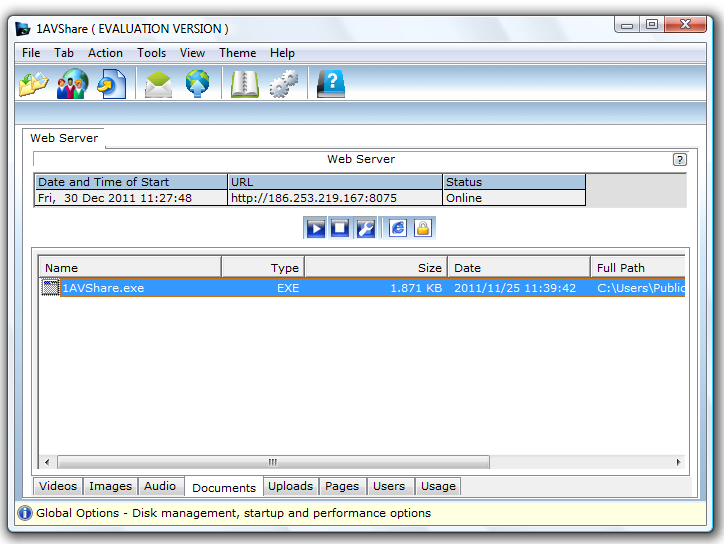
[GIVE AWAY] 1AVShare, the ultimate secure file sharing software for free.

PCWinSoft brings to you an exciting offer. The company is giving away free licenses of 1AVShare, the ultimate file sharing software. 1AVShare costs $49.95 but in here you get it for FREE.

1AVShare is a cool lightweight gadget that allows you to share files with your friends and co-workers in a safe and secure environment: 1AVShare publishes a 128-bit encrypted password protected website where you can safely share movie files, music files, documents, executable files, and files of other extensions.


1AVShare utilizes Windows native security to safe guard your shared content. So, breaking up 1AVShare security is as difficult as breaking Windows security so it is safe to say 1AVShare security is unbreakable.

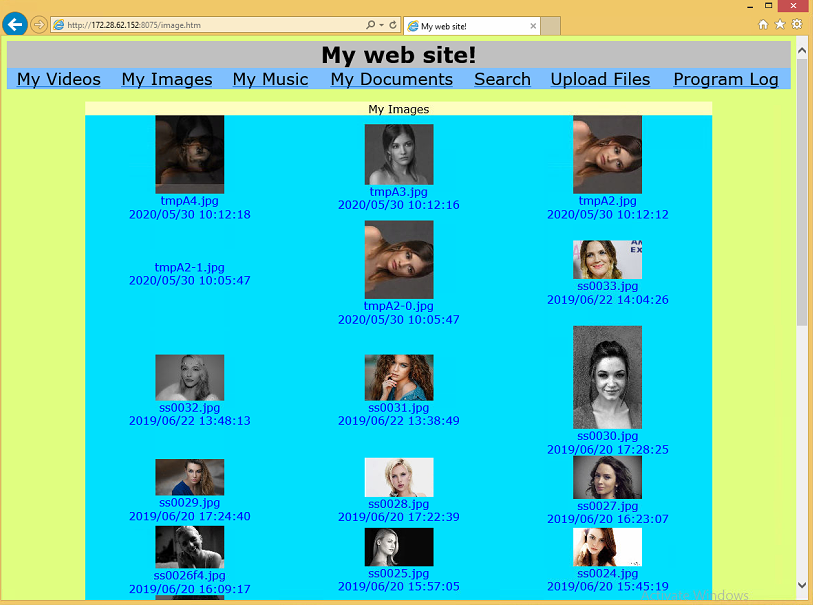
After you start 1AVShare web server it creates a website for you and you can send the link to your friends and co-workers and you are also in charge of granting access rights and you can do that on a user base, so for one user you can allow access to the documents page, and for another user you can allow access to the images page only, you can grant access to one or all pages. You the web master defines the access roles, usernames and passwords of your visitors.


1AVShare is very lightweight and you can leave it running 24x7. The website it creates can be accessed from anywhere in the World without the need to install client components and it works for all web browsers, no exception.

It will run on 2000/XP/2003/Media Center/Vista/Windows 7/Windows 8 and requires at least a 1.3gHz processor and 256mb of memory.

To receive your free copy of 1AVShare simply register here: http://www.pcwinsoft.com/promotion/geektechie123/registration.asp

Monday, April 23, 2012

Populating Local Computer "Users" and "Groups" using C# DotNet 4.0

 You need to have include reference to following two dlls:
using System.DirectoryServices;
using System.DirectoryServices.AccountManagement;
Adding reference for DLLs

1:     static void Main(string[] args) 
2:      { 
3:        List<string> usersList = new List<string>(); 
4:        List<string> groupsList = new List<string>(); 
5:   
6:        // Populating Local Computer "Users" and "Groups"  
7:        Console.WriteLine("================================================="); 
8:         
9:        //Create your domain context to Machine level 
10:        PrincipalContext pContext = new PrincipalContext(ContextType.Machine); 
11:   
12:        //Query as UserPrincipal  
13:        UserPrincipal uPrincipal = new UserPrincipal(pContext); 
14:   
15:        //Create principal searcher passing in the User principal   
16:        PrincipalSearcher pSearcher = new PrincipalSearcher(uPrincipal); 
17:   
18:        // find all matches 
19:        foreach (Principal principal in pSearcher.FindAll()) 
20:        { 
21:          if(!usersList.Contains(principal.Name)) 
22:            usersList.Add(principal.Name); 
23:           
24:          foreach (Principal grpPrincipal in principal.GetGroups()) 
25:          { 
26:            if (!groupsList.Contains(grpPrincipal.Name)) 
27:              groupsList.Add(grpPrincipal.Name); 
28:             
29:          } 
30:        } 
31:   
32:        //Groups 
33:        foreach(string group in groupsList ) 
34:          Console.WriteLine(" Group Name :: " + group); 
35:        Console.WriteLine("***************"); 
36:   
37:        //Users 
38:        foreach (string user in usersList) 
39:          Console.WriteLine(" User Name :: " + user); 
40:   
41:        Console.WriteLine("================================================="); 
42:        foreach (Principal principal in pSearcher.FindAll()) 
43:        { 
44:   
45:          foreach (Principal grpPrincipal in principal.GetGroups()) 
46:          { 
47:            using (DirectoryEntry dGroupEntry = new DirectoryEntry(string.Format("WinNT://./{0},group", grpPrincipal.Name))) 
48:            {             
49:              foreach (Object member in (IEnumerable)dGroupEntry.Invoke("Members")) 
50:              { 
51:                using (DirectoryEntry dMemberEntry = new DirectoryEntry(member)) 
52:                { 
53:                  Console.WriteLine(string.Format(" User {0} is Member of Group {1}.", dMemberEntry.Name, grpPrincipal.Name)); 
54:                } 
55:              } 
56:            } 
57:   
58:          } 
59:        } 
60:   
61:        Console.WriteLine("================================================="); 
62:        //clear lists 
63:        usersList.Clear(); 
64:        groupsList.Clear(); 
65:   
66:        using (DirectoryEntry dEntry = new 
67:               DirectoryEntry("WinNT://" + Environment.MachineName + ",computer")) 
68:        { 
69:          //Filter only "user" and "Groups" objects            
70:          dEntry.Children.SchemaFilter.Add("user"); 
71:          dEntry.Children.SchemaFilter.Add("group"); 
72:          foreach (DirectoryEntry dChildEntry in dEntry.Children) 
73:          { 
74:            if (dChildEntry.SchemaClassName.Equals("User", StringComparison.OrdinalIgnoreCase)) 
75:            { 
76:              usersList.Add(dChildEntry.Name); 
77:            } 
78:            else 
79:            { 
80:              groupsList.Add(dChildEntry.Name); 
81:            } 
82:          } 
83:   
84:        } 
85:   
86:        //Groups 
87:        foreach (string group in groupsList) 
88:          Console.WriteLine(" Group Name :: " + group); 
89:        Console.WriteLine("***************"); 
90:   
91:        //Users 
92:        foreach (string user in usersList) 
93:          Console.WriteLine(" User Name :: " + user); 
94:        Console.WriteLine("================================================="); 
95:        Console.ReadKey(); 
96:      } 


OUTPUT:

=================================================
 Group Name :: Administrators
 Group Name :: Remote Desktop Users
 Group Name :: Users
 Group Name :: Guests
 Group Name :: HelpServicesGroup
***************
 User Name :: Administrator
 User Name :: ASPNET
 User Name :: Guest
 User Name :: HelpAssistant
 User Name :: IUSR_VIRTUAL01
 User Name :: IWAM_VIRTUAL01
 User Name :: SUPPORT_388945a0
 User Name :: TestAdmin
=================================================
 User Administrator is Member of Group Administrators.
 User TestAdmin is Member of Group Administrators.
 User Administrator is Member of Group Remote Desktop Users.
 User INTERACTIVE is Member of Group Users.
 User Authenticated Users is Member of Group Users.
 User ASPNET is Member of Group Users.
 User TestAdmin is Member of Group Users.
 User Guest is Member of Group Guests.
 User IUSR_VIRTUAL01 is Member of Group Guests.
 User Guest is Member of Group Guests.
 User IUSR_VIRTUAL01 is Member of Group Guests.
 User SUPPORT_388945a0 is Member of Group HelpServicesGroup.
 User Administrator is Member of Group Administrators.
 User TestAdmin is Member of Group Administrators.
 User INTERACTIVE is Member of Group Users.
 User Authenticated Users is Member of Group Users.
 User ASPNET is Member of Group Users.
 User TestAdmin is Member of Group Users.
=================================================
 Group Name :: Administrators
 Group Name :: Backup Operators
 Group Name :: Guests
 Group Name :: Network Configuration Operators
 Group Name :: Power Users
 Group Name :: Remote Desktop Users
 Group Name :: Replicator
 Group Name :: Users
 Group Name :: DB2ADMNS
 Group Name :: DB2USERS
 Group Name :: HelpLibraryUpdaters
 Group Name :: HelpServicesGroup
 Group Name :: SQLServer2005SQLBrowserUser$VIRTUAL01
 Group Name :: SQLServerDTSUser$VIRTUAL01
 Group Name :: SQLServerFDHostUser$virtual01$MSSQLSERVER
 Group Name :: SQLServerMSASUser$VIRTUAL01$MSSQLSERVER
 Group Name :: SQLServerMSSQLServerADHelperUser$VIRTUAL01
 Group Name :: SQLServerMSSQLUser$virtual01$MSSQLSERVER
 Group Name :: SQLServerMSSQLUser$virtual01$SQLEXPRESS
 Group Name :: SQLServerReportServerUser$VIRTUAL01$MSRS10_50.MSSQLSERVER2008
 Group Name :: SQLServerSQLAgentUser$VIRTUAL01$MSSQLSERVER
 Group Name :: SQLServerSQLAgentUser$VIRTUAL01$SQLEXPRESS
***************
 User Name :: Administrator
 User Name :: ASPNET
 User Name :: Guest
 User Name :: HelpAssistant
 User Name :: IUSR_VIRTUAL01
 User Name :: IWAM_VIRTUAL01
 User Name :: SUPPORT_388945a0
 User Name :: TestAdmin
=================================================

Authenticate a Local User using UserName/Password pair:

1:   
2:      static void Main(string[] args) 
3:      { 
4:        string userName = "TestAdmin"; 
5:        string password = "********"; 
6:   
7:        //Authenticate a Local User using UserName/Password pair 
8:        using (PrincipalContext context = new PrincipalContext(ContextType.Machine)) 
9:        { 
10:          bool isAuthenticated = context.ValidateCredentials(userName, password); 
11:          if (isAuthenticated) 
12:          { 
13:            Console.WriteLine(string.Format("User Name ({0}) is a authenticated user!", userName)); 
14:          } 
15:          else 
16:          { 
17:            Console.WriteLine(string.Format("User Name ({0}) is a not authenticated, bad user name or password!", userName));  
18:          } 
19:        } 
20:   
21:        Console.ReadKey(); 
22:      } 


OUTPUT:

User Name (TestAdmin) is a authenticated user!
 

or


User Name (TestAdmin) is a not authenticated, bad user name or password!


Wednesday, February 15, 2012

C# Bitwise Shift Operators

C# Bitwise Shift Operators
The bitwise shift operators in the C# language to an integral type provides a way to change the bit representation of a type so that the bits are shifted right or shifted left a certain number of positions. The C# language enables bitwise shifting by offering the right shift (>>) and left shift (<<) operators directly in the language. The term "bitwise operator" indicates an operator that receives one or two operands and is meant to change the bit representation of an integer.
This post is all about the C# Bitwise shift operators, using these bitwise operator we will first revise some basics first.

Integral Types
Type
Size (in bits)
Range
sbyte
8
-128 to 127
byte
8
0 to 255
short
16
-32768 to 32767
ushort
16
0 to 65535
int
32
-2147483648 to 2147483647
uint
32
0 to 4294967295
long
64
-9223372036854775808 to 9223372036854775807
ulong
64
0 to 18446744073709551615
char
16
0 to 65535

Integral types are well suited for those operations involving whole number calculations. The char type is the exception, representing a single Unicode character. As you can see from the table above, you have a wide range of options to choose from, depending on your requirements.

Floating Point and Decimal Types
A C# floating point type is either a float or double. They are used any time you need to represent a real number. Decimal types should be used when representing financial or money values.

Type
Size (in bits)
precision
Range
float
32
7 digits
1.5 x 10-45 to 3.4 x 1038
double
64
15-16 digits
5.0 x 10-324 to 1.7 x 10308
decimal
128
28-29 decimal places
1.0 x 10⁻²⁸ to 7.9 x 1028

Floating point types are used when you need to perform operations requiring fractional representations. However, for financial calculations, the decimal type is the best choice because you can avoid rounding errors.

C# Operators
The following table describes the allowable operators, their precedence, and associativity.


Operator Categories
Operator(s)
Associativity
Primary
x.y  f(x)  a[x]  x++  x--  new  typeof  default  checked  unchecked delegate
left
Unary
+  -  !  ~  ++x  --x  (T)x
right
Multiplicative
*  /  %
left
Additive
+  -
left
Shift
<<  >>
left
Relational
<  >  <=  >=  is as
left
Equality
==  !=
right
Logical AND
&
left
Logical XOR
^
left
Logical OR
|
left
Conditional AND
&&
left
Conditional OR
||
left
Null Coalescing
??
left
Ternary
?:
right
Assignment
=  *=  /=  %=  +=  -=  <<=  >>=  &=  ^=  |=  =>
right
Left associativity means that operations are evaluated from left to right.
Right associativity mean all operations occur from right to left, such as assignment operators where everything to the right is evaluated before the result is placed into the variable on the left.
Most operators are either unary or binary. Unary operators form expressions on a single variable, but binary operators form expressions with two variables.

Shift Left Operator
The shift operators allow programmers to adjust an integer by shifting all of its bits to the left or the right. The following diagram shows the affect of shifting a value to the left by one digit. 
  00001000  =  8 
After Applying SHIFT LEFT 
 00010000  =  16
As you can see, each bit is moved to the left and the lowest order bit becomes zero. As this is a binary operation, the effect of shifting to the left is to double the value. In fact, this method is often used to perform some multiplication as it can be faster than using arithmetic multiplication.
In C#, the shift left operator is represented as two less than signs (<<). The operator can be used to shift the binary number by one or more digits. The number of digits is specified after the operator, as in the following code:


        /// Claculates multiples of two 2
        static long MultipleOfTwo(long value, int  noTimesShift)
        {
            long result = 0;
             result = value << noTimesShift-1;           
            return result;
        }
Shift Right Operator
The shift right operator provides the reverse of shift left, moving each bit to the right by a number of digits. C# uses two greater than signs (>>) for the operator. 
  00010000  =  16 
After Applying SHIFT RIGHT 
  00001000  =  8 


        /// Divides a value by Two 2
        static long DivideByTwo(long value, int noTimesShift)
        {
            long result = 0;
            result = value >> noTimesShift - 1;
            return result;
        }
       
        public static string ToBinary(long Decimal)
        {
            // Declare a few variables we're going to need
            long BinaryHolder;
            char[] BinaryArray;
            string BinaryResult = "";

            while (Decimal > 0)
            {
                BinaryHolder = Decimal % 2;
                BinaryResult += BinaryHolder;
                Decimal = Decimal / 2;
            }

            BinaryArray = BinaryResult.ToCharArray();
            Array.Reverse(BinaryArray);
            BinaryResult = new string(BinaryArray);

            return BinaryResult;
        }

        static void Main(string[] args)
        {
            //For LeftShift Operator
            for (int i = 1; i <= 16; i++)
            {
                long multiple = MultipleOfTwo(2, i);             
                Console.WriteLine("{0}^{1}={2} (B{3} --> B{4})", 2, i, multiple,ToBinary(i), ToBinary(multiple));
            }

            //For RightShift Operator
            for (int i = 16; i >= 1; i--)
            {
                long multiple = MultipleOfTwo(2, i);
                long div = DivideByTwo(multiple, 2);            
                Console.WriteLine("{0}/{1} = {2} (B{3}) --> (B{4})", multiple, 2, div, ToBinary(multiple), ToBinary(div));
            }
            Console.ReadLine();
        }


 OutPut: 
 2^1=2 (B1 --> B10)
 2^2=4 (B10 --> B100) 
 2^3=8 (B11 --> B1000) 
 2^4=16 (B100 --> B10000) 
 2^5=32 (B101 --> B100000) 
 2^6=64 (B110 --> B1000000) 
 2^7=128 (B111 --> B10000000) 
 2^8=256 (B1000 --> B100000000)
 2^9=512 (B1001 --> B1000000000) 
 2^10=1024 (B1010 --> B10000000000) 
 2^11=2048 (B1011 --> B100000000000)
 2^12=4096 (B1100 --> B1000000000000) 
 2^13=8192 (B1101 --> B10000000000000)
 2^14=16384 (B1110 --> B100000000000000) 
 2^15=32768 (B1111 --> B1000000000000000)
 2^16=65536 (B10000 --> B10000000000000000) 
 
 65536/2 = 32768 (B10000000000000000) --> (B1000000000000000) 
 32768/2 = 16384 (B1000000000000000) --> (B100000000000000)
 16384/2 = 8192 (B100000000000000) --> (B10000000000000)
 8192/2 = 4096 (B10000000000000) --> (B1000000000000) 
 4096/2 = 2048 (B1000000000000) --> (B100000000000) 
 2048/2 = 1024 (B100000000000) --> (B10000000000) 
 1024/2 = 512 (B10000000000) --> (B1000000000) 
 512/2 = 256 (B1000000000) --> (B100000000)
 256/2 = 128 (B100000000) --> (B10000000) 
 128/2 = 64 (B10000000) --> (B1000000) 
 64/2 = 32 (B1000000) --> (B100000) 
 32/2 = 16 (B100000) --> (B10000) 
 16/2 = 8 (B10000) --> (B1000)
 8/2 = 4 (B1000) --> (B100) 
 4/2 = 2 (B100) --> (B10)
 2/2 = 1 (B10) --> (B1)
 
Overflow Bits
When using either shift function, one bit, called the overflow bit, will be shifted outside of the binary value. The value of this digit is lost during the operation and cannot be recovered. Should the value of the bit be important then it should be tested before the shifting using a logical bitwise operator. The loss overflow data is important if the shift operations are being used for multiplication or division to ensure the correct result:
            uint val = 35;
            Console.WriteLine(val>>1);  // output 17

Signed Integers
As indicated in a previous article, signed integers use the highest order bit to determine if a value is positive or negative and that the remaining bits use two's complement notation for negative values The highest order bit would normally be considered as the overflow bit for a shift left operation. To allow for this, C# ignores the bit for signed data types and shifts negative values accordingly. Thus shifting works for positive and negative values.
            int value = -300;
            Console.WriteLine(value >> 1);  //output -150
 
Write a function to calculate A^B?

        /// Calculates A^B i.e. in this function bases^power
        static double PowerOfNumber(double bases, double power)
        {
            double result = 1;
            for(int i=0;i<=power-1;i++)
                result *= bases;
            return result;
        }

Saturday, February 4, 2012

Method Parameters (• params • ref • out )


Method Parameters 
If a parameter is declared for a method without ref or out, the parameter can have a value associated with it. That value can be changed in the method, but the changed value will not be retained when control passes back to the calling procedure. By using a method parameter keyword, you can change this behavior.
Keywords you can use when declaring method parameters:
  • params keyword
  • ref keyword
  • out keyword  
·   params keyword 
o   By params keyword variable number of arguments for methods
o   You can send a comma-separated list of arguments of the type specified in the parameter declaration, or an array of arguments of the specified type
o   You also can send no arguments
o    Only one params keyword is permitted in a method declaration

Example
Consider the following method:
public static void IntParams(params int[] items)
        {
            if (items.Length == 0)
            {
                Console.WriteLine("Empty parameters supplied!");
              return;
            }

            foreach (int i in items)
            {
                Console.Write("\t" + i);
            }

            Console.WriteLine();
        }

               
Calling the method:
                MyClass.IntParams(1, 2, 3, 4, 6, 7, 8, 9, 10);
Output:   1  2  3  4  6  7  8  9  10

MyClass.IntParams();
Output:   Empty parameters supplied!


·   ref keyword 
o   The ref  keyword causes an argument to be passed by reference, not by value
o   The effect of ref  keyword is that any change to the parameter is also reflected back in the argument variable of calling method i.e. both parameter and argument have same value
o   The ref  keyword must be explicitly used by calling method and in method definition
o   An argument that is passed to a ref  parameter must be initialized before it is passed (Note: for out keyword this is not necessary)
o   For Method overloading the usage of ref  and out keyword in a overload method is a compile error
The following method declaration gives compile time error:
//Error 1: Cannot define overloaded method 'OverloadMethod' because it differs from another method only on ref and out
public void OverloadMethod(out int i) { }
 public void OverloadMethod(ref int i) { }

Whereas the following method overloading works fine for ref and out:
public void OverloadMethod(int i) { }
 public void OverloadMethod(ref int i) { }

public void OverloadMethod(int i) { }
 public void OverloadMethod(out int i) { }

o  The ref  and out keywords cause different run-time behavior, they are not considered part of the method signature at compile time
o  The most important point is that “A method parameter can be modified by ref  regardless of whether it is a value type or a reference type. Do not confuse the concept of passing by reference with the concept of reference types. The two concepts are not the same.”
        public static void RefParamUsage(ref int i)
        {
           i = i + 44;
        }

  int val = 1;
         MyClass.RefParamUsage(ref val);
         Console.WriteLine(val);
  The output is :  i = 45
o  Properties are not variables. They are methods, and cannot be passed to ref  parameters.
  
·   out keyword 
o   The out keyword causes arguments to be passed by reference. Same as ref keyword, except that ref requires that the variable be initialized before it is passed. Whereas the variable as out argument doesn’t need to be initialized before it is passed.
o   The out contextual keyword is used in two contexts:
§  As a parameter modifier in parameter lists
§  In generic type parameter declarations in interfaces and delegates
o   The out keyword must be explicitly used by calling method and in method definition
o   The calling method must assign a value before the method returns
o   Declaring an out method is useful when you want a method to return multiple values.