Saturday, May 17, 2014

NDepend V5: Improvments and New Features


 Improvments and New Features:
      NDepend is improving day by day, and with the release of version (V5) more features and enhancements are onboard. I started using NDepend from last year, and I used it often for improving my development capabilities and coding technique. NDepend makes it easier for you to analyze the code and identifies the lacking areas and give you a brief guide about best practices.

Following are the key features/improvements over previous release:
  • Report Enhancements:  
                With the release of the NDepend V5 the reports are redesigned and trend metric charts are also included in reports. Following are the sections vaialble in the reports:
    • Rules
    • Trend Charts
    • Metrics
    • Dependencies
    • Object Oriented Design
    • API Breaking Changes
    • Code Diff Summary
    • Test and Code Coverage
    • Dead Code
    • Build Order
    • Analysis Log
NDepend Report showing analysis result

  • Dashboard Panel
 Dashboard panel gives a summarized view of the analysis of the code base.
Dashboard Panel (Visual Studio)

Dashboard Panel Showing Rules Summary (Visual NDepend)
Dashboard Panel Showing Trend metric (Visual NDepend)
  • Trend Monitoring
                With NDepend we can create trend charts. Trend charts are made of trend metrics whose values are  logged over time at analysis time. As default some trend metrics are available and it is easy to create your own trend metrics. Trend charts are displayed on the NDepend dashboard. NDepend dashboard shows following default trend charts:
  • Lines of Code
  • Number of Code Rules Violated and number of Code Rules Violations
  • Code Coverage per Tests
  • Max and Average values for various Code Quality Metrics
  • Third-Party UsageTrend charts are displayed on the NDepend dashboard.

Trend charts can be customized and it is easy to create your own trend charts to show default or custom trend metrics.
 
Trend metrics options available in NDepend
Trend metric
  • Support for Visual Studio
             NDepend is fully integrated with visual studio stack. Using visual studio Add-in you can add NDepend support to visual studio, and you are able to see all the reports, trend charts, dashboard, etc in the visual studio. Another option is Visual NDepend UI, using Visual NDepend you can view the analysis results standalone.
Visual studio Add-in options
  • More Recent Rules violation
              With this feature we can compare two different NDepend projects and see the results after comparing with the Baseline project. This feature is useful in order to determine what rules are violated since the last analysis done.
Dashboard showing Recent Rule violation and code differences  found

  • Better Path Management
                  NDepend provides better path management support, following path are supported by NDepend:

                   Absolute : with drive letter C:\ or UNC \\Server\Share format.
                   Relative : to the NDepend project file location.
                   Prefixed with an environment variable with the syntax %ENVVAR%\Dir\
                   Prefixed with a path variable with the syntax $(Variable)\Dir

Path referenced in NDepend and supported paths

  • More Console Options
                Following are the console options available in the NDepend:             
//  NDepend v5.2.1.8320
//  http://www.NDepend.com
//  support@NDepend.com
//  Copyright (C) Patrick Smacchia 2004-2014
//  All Rights Reserved
//

NDepend accepts these arguments:
 
  /ViewReport                 to view the HTML report

  /Silent                     to disable output on console

  /HideConsole                to hide the console window

  /Concurrent                 to parallelize analysis execution
 
  /LogTrendMetrics            to force log trend metrics
 
 /TrendStoreDir              to override the trend store directory specified in the NDepend project file.

  /PersistHistoricAnalysisResult   to force persist historic analysis result

  /HistoricAnalysisResultsDir to override the historic analysis results directory specified in the NDepend project file.

  /OutDir dir                 to override the output directory specified in the NDepend project file.

  /XslForReport xlsFilePath   to provide your own Xsl file used to build report

  /InDirs [/KeepProjectInDirs] dir1 [dir2 ...]
                              to override input directories specified in the NDepend project file.

  /CoverageFiles [/KeepProjectCoverageFiles] file1 [file2 ...]
                              to override input coverage files specified in the NDepend project file.

  /PathVariables Name1 Value1 [Name2 Value2 ...]
                              to override the values of one or several NDepend project path variables, or
                              create new path variables.

  /AnalysisResultToCompareWith
                              to provide a previous analysis result to compare with.

  /Help                       to display the current help on console


Saturday, May 25, 2013

NDepend V4: A Product Review

About NDepend:   
This is the first time since beginning of my career, that I am using tool for measuring the application. NDepend is unique and innovative tool which predicts about the application and states the factors that are critical to well developed software application, and shows results in a graphical manner. It incorporates several Code Metrics, Standard and Custom Rules that are checked upon analyzing the application, and suggests the lacking area in terms of Software Quality.

    NDepend offers variety of features notably some of them are Code Metrics, Dependency Matrix and Graph, Code Difference, Code Coverage, Metrics for OOAD semantics and many more other attributes in the stack. It is fully integrated with Visual Studio and is readily available for developers as a Visual Studio AddIn. Basically, it iterates through the product metadata and gathers the statistics about the application and recommends possible remedial action for the better coded application, and highlights dark sides of an application that needs attention, which is usually overlooked by many of software developers.

Main Functions:
1). Analysing VS.Net Solution and VSNet Projects
2). Analysing .Net Assemblies in a Folder
3). Analysing a Set of .Net Assemblies

Features:
             1. NDepend Class Browser

                   It provides the Class Hierarchy feature as a tree view from .Net assembly.

Abstraction Vs Intsability


Class Browser 
               2. NDepend  Search
     Using search feature  you can find  method by name, by Full Name or by using CQLinq query. This feature is not limited to Name, you can search by size, complexity, coupling etc also. Also you can search for the difference between two snapshots of your code.
Search


            3. Queries and Rule Explorer and Editor
     It provides with capability of viewing and editing the Query and Critical rules that must not be violated. For this CQLinq (Code Query LINQ) provides a way to query .Net code, and helps you in fulfilling your custom queries.
Queries and Rule Editor
For instance you can query methods which has LOC(Line of Codes) more than 30 by using simple syntax:
            from m in Methods where m.NbLinesOfCode > 30 select m
Also Queries and Rules Summary explorer panel shows the highlight of the number of rules satisfied and violated.

Queries and Rule Explorer

             4. Dependency Matrix
     It represents the dependencies between the software components within the software application.

Dependency Diagram

Dependency Matrix


Dependency Matrix

             5. Dependency Graph
     It represents the relationship between the .Net assemblies used in the software application. In addition to Dependency Graph different graphs are available to visually support the developer such as: Call Graph, Class Inheritance Graph, Coupling Graph, Path Graph, Cycle Graph etc.
Dependency Graph

6. Metrics
     Several metrics are already available to assist you in dealing with development of Quality software application. These metrics are applied at various levels from .Net Application, Namespaces, Types, Method to field level, in order to provide you full control on each aspect of software.
Metrics - Type Level

Metrics - Method Level

Metrics - Namespace Level
Conclusion:
     As I stated in the beginning I have never used tool for measuring Application, but after using NDepend I personally feeling good and found it more useful. Now I am able to able to analyze my code in better way to maintain standards in developing software applications. My experience with Ndepend is good, though I have explained some of the features, I still would like to advise everyone out there to take a chance to evaluate NDepend (http://www.ndepend.com/NDependDownload.aspx).  

Thursday, December 13, 2012

Struct Vs Class in C#


·         Structs are value types and classes are reference types.
·         Value type instances are allocated on the stack. Reference type instances are allocated on the heap.
·         In .Net the struct and class declarations differentiate between reference types and value types.
·         When you pass around a reference type there is only one actually stored. All the code that accesses  the instance is accessing the same one.
·        When you pass around a value type each one is a copy. All the code is working on its own copy.
This can be shown with an example:
struct MyStruct
{
    string MyProperty { get; set; }
}
void ChangeMyStruct(MyStruct input)
{
   input.MyProperty = "new value";
}

// Create value type
MyStruct testStruct = new MyStruct { MyProperty = "initial value" };
ChangeMyStruct(testStruct);
// Value of testStruct.MyProperty is still "initial value"
//  the method changed a new copy of the structure.

For a class this would be different:

class MyClass
{
    string MyProperty { get; set; }
}
void ChangeMyClass(MyClass input)
{
   input.MyProperty = "new value";
}
// Create reference type
MyClass testClass = new MyClass { MyProperty = "initial value" };
ChangeMyClass(testClass);

// Value of testClass.MyProperty is now "new value"
// the method changed the instance passed.

·         Classes can be nothing - the reference can point to a null.
·         Structs are the actual value - they can be empty but never null. For this reason structs always have a default constructor with no parameters.
·         The struct can't use the protected or protected internal modifier. The class can use all the access modifiers.
·         A struct always has a built-in public default constructor. This means that a struct is always instantiable whereas a class might not be since all its constructors could be private.
class NonInstantiable
{
    private NonInstantiable() // ok
    {
    }
}

struct Direct
{
    private Direct() // compile-time error
    {
    }
}

·         A structs static constructor is not triggered by calling the structs default constructor. It is for a class.
struct Direct
{
//static constructor not called when new instance is created by //statement i.e.  new Direct()
static Direct()      
{
        Console.WriteLine("This is not written");
 }
}

    static void Main()
    {
       //static constructor not called when new instance is created
        Direct local = new Direct();
    }

class Direct
{
//static constructor called when new instance is created by statement i.e.  new Direct()
 static Direct()      
{
        Console.WriteLine("This is written");
                }
}

    static void Main()
    {
       //static constructor called when new instance is created
        Direct local = new Direct();
    }
·         A struct instance cannot be null. A class instance can be null.
·         A struct type cannot use the as operator. A class can use as operator.
  SampleStruct obj2 = obj1 as SampleStruct; //compile time error
  SampleClass obj2 = obj1 as SampleClass; //Compiles OK
·         A struct cannot have a destructor but a class can have a destructor. A destructor is just an override of object.Finalize in disguise, and structs, being value types, are not subject to garabge collection.
~SampleStruct() //compile time error
  ~SampleClass() //Compiles OK
·         You can initialize fields in a class at their point of declaration. For example:
class Indirect
{
    //...
    private int field = 42;  
}
You can't do this for fields in a struct. For example:
struct Direct
{
    //...
    private int field = 42; // compile-time error
}

·         Classes inherit Object.Equals which implements identity equality whereas structs inherit ValueType.Equals which implements value equality.
·         A struct is implicitly sealed, a class isn't.
·         A struct can't be abstract, a class can.
·         A struct can't extend another class, a class can.
·         A struct can't declare protected members (e.g. fields, nested types) a class can.
·         A struct can't declare abstract function members, an abstract class can.
·         A struct can't declare virtual function members, a class can.
·         A struct can't declare sealed function members, a class can.
·         A struct can't declare override function members, a class can. The one exception to this rule is that a struct can override the virtual methods of System.ObjectEquals(), and GetHashCode(), and ToString().


Saturday, November 10, 2012

User-Defined Conversions in C#: implicit or explicit

C# allows programmers to declare conversions on classes or structs so that classes or structs can be converted to and/or from other classes or structs, or basic types. Conversions are defined like operators and are named for the type to which they convert.

In C#, conversions can be declared either as implicit, which occur automatically when required, or explicit, which require a cast to be called. All conversions must be static, and must either take the type the conversion is defined on, or return that type.

Example:
 using System;  
   
 namespace ImplicitConversion  
 {  
   class Conversion  
   {  
     static void Main(string[] args)  
     {  
       ConvertibleDouble cdouble;  
   
       // Perform an implicit conversion from a int to a ConvertibleDouble  
       // No cast is required because implicit cast is defined  
       // i.e. public static implicit operator ConvertibleDouble(double val)  
       cdouble = 200;  
       System.Console.WriteLine(cdouble);  
   
       // Perform an implicit conversion from a ConvertibleDouble to a double  
       // No cast is required because implicit cast is defined   
       // i.e. public static implicit operator double(ConvertibleDouble val)  
       double a = new ConvertibleDouble(999);  
       System.Console.WriteLine(a);  
   
       // Perform an explicit conversion from a string to a ConvertibleDoubl  
       // cast is required because explicit cast is defined   
       // i.e. public static explicit operator ConvertibleDouble(string val)  
       string obj = "$400.00";  
       ConvertibleDouble b = (ConvertibleDouble)obj;  
       System.Console.WriteLine(b);  
   
   
       // Perform an explicit conversion from a ConvertibleDoubl to a string  
       // cast is required because explicit cast is defined   
       // i.e. public static explicit operator ConvertibleDouble(string val)       
       string d = (string)b;  
       System.Console.WriteLine(d);  
   
   
       System.Console.WriteLine("Press any key to exit.");  
       System.Console.ReadKey();  
     }  
   }  
   
   struct ConvertibleDouble  
   {  
     private double _val;  
   
     public ConvertibleDouble(double val)  
     {  
       this._val = val;  
     }  
   
     public static implicit operator ConvertibleDouble(double val)  
     {  
       return new ConvertibleDouble(val);  
     }  
   
     public static implicit operator double(ConvertibleDouble val)  
     {  
       return val._val;  
     }  
   
     public static explicit operator ConvertibleDouble(string val)  
     {  
       return new ConvertibleDouble(Convert.ToDouble(val.Trim().Replace("$", "")));  
     }  
   
     public static explicit operator string(ConvertibleDouble val)  
     {  
       return string.Format("${0:N2}", val._val);  
     }  
   
     public override string ToString()  
     {  
       return _val.ToString();  
     }  
   }  
 }  


OutPut:
 200  
 999  
 400  
 $400.00  
 Press any key to exit.  
   

Friday, November 2, 2012

[GIVE AWAY] 1AVShare, the ultimate secure file sharing software for free.

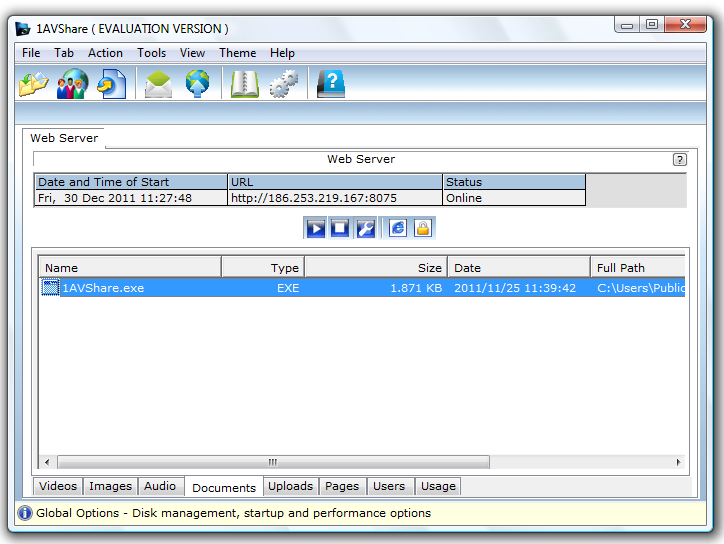
PCWinSoft brings to you an exciting offer. The company is giving away free licenses of 1AVShare, the ultimate file sharing software. 1AVShare costs $49.95 but in here you get it for FREE.

1AVShare is a cool lightweight gadget that allows you to share files with your friends and co-workers in a safe and secure environment: 1AVShare publishes a 128-bit encrypted password protected website where you can safely share movie files, music files, documents, executable files, and files of other extensions.


1AVShare utilizes Windows native security to safe guard your shared content. So, breaking up 1AVShare security is as difficult as breaking Windows security so it is safe to say 1AVShare security is unbreakable.

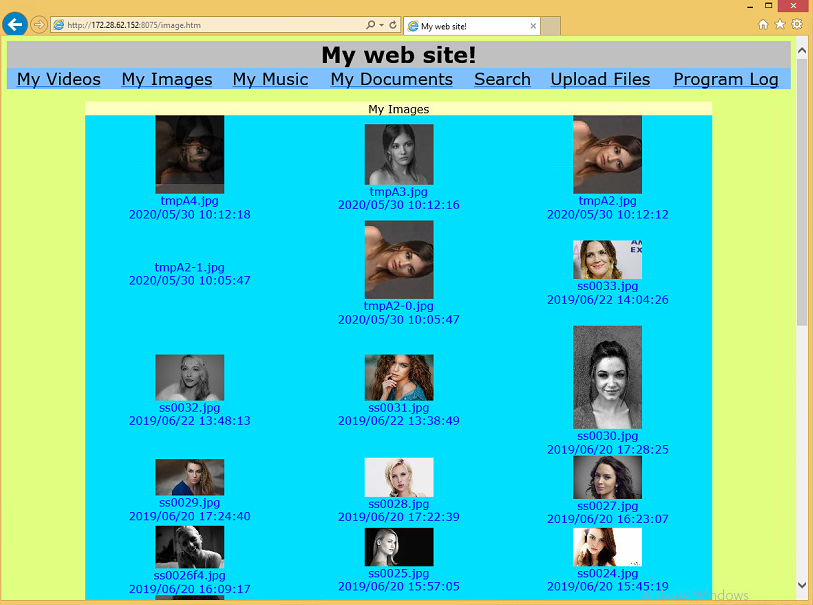
After you start 1AVShare web server it creates a website for you and you can send the link to your friends and co-workers and you are also in charge of granting access rights and you can do that on a user base, so for one user you can allow access to the documents page, and for another user you can allow access to the images page only, you can grant access to one or all pages. You the web master defines the access roles, usernames and passwords of your visitors.


1AVShare is very lightweight and you can leave it running 24x7. The website it creates can be accessed from anywhere in the World without the need to install client components and it works for all web browsers, no exception.

It will run on 2000/XP/2003/Media Center/Vista/Windows 7/Windows 8 and requires at least a 1.3gHz processor and 256mb of memory.

To receive your free copy of 1AVShare simply register here: http://www.pcwinsoft.com/promotion/geektechie123/registration.asp

Monday, April 23, 2012

Populating Local Computer "Users" and "Groups" using C# DotNet 4.0

 You need to have include reference to following two dlls:
using System.DirectoryServices;
using System.DirectoryServices.AccountManagement;
Adding reference for DLLs

1:     static void Main(string[] args) 
2:      { 
3:        List<string> usersList = new List<string>(); 
4:        List<string> groupsList = new List<string>(); 
5:   
6:        // Populating Local Computer "Users" and "Groups"  
7:        Console.WriteLine("================================================="); 
8:         
9:        //Create your domain context to Machine level 
10:        PrincipalContext pContext = new PrincipalContext(ContextType.Machine); 
11:   
12:        //Query as UserPrincipal  
13:        UserPrincipal uPrincipal = new UserPrincipal(pContext); 
14:   
15:        //Create principal searcher passing in the User principal   
16:        PrincipalSearcher pSearcher = new PrincipalSearcher(uPrincipal); 
17:   
18:        // find all matches 
19:        foreach (Principal principal in pSearcher.FindAll()) 
20:        { 
21:          if(!usersList.Contains(principal.Name)) 
22:            usersList.Add(principal.Name); 
23:           
24:          foreach (Principal grpPrincipal in principal.GetGroups()) 
25:          { 
26:            if (!groupsList.Contains(grpPrincipal.Name)) 
27:              groupsList.Add(grpPrincipal.Name); 
28:             
29:          } 
30:        } 
31:   
32:        //Groups 
33:        foreach(string group in groupsList ) 
34:          Console.WriteLine(" Group Name :: " + group); 
35:        Console.WriteLine("***************"); 
36:   
37:        //Users 
38:        foreach (string user in usersList) 
39:          Console.WriteLine(" User Name :: " + user); 
40:   
41:        Console.WriteLine("================================================="); 
42:        foreach (Principal principal in pSearcher.FindAll()) 
43:        { 
44:   
45:          foreach (Principal grpPrincipal in principal.GetGroups()) 
46:          { 
47:            using (DirectoryEntry dGroupEntry = new DirectoryEntry(string.Format("WinNT://./{0},group", grpPrincipal.Name))) 
48:            {             
49:              foreach (Object member in (IEnumerable)dGroupEntry.Invoke("Members")) 
50:              { 
51:                using (DirectoryEntry dMemberEntry = new DirectoryEntry(member)) 
52:                { 
53:                  Console.WriteLine(string.Format(" User {0} is Member of Group {1}.", dMemberEntry.Name, grpPrincipal.Name)); 
54:                } 
55:              } 
56:            } 
57:   
58:          } 
59:        } 
60:   
61:        Console.WriteLine("================================================="); 
62:        //clear lists 
63:        usersList.Clear(); 
64:        groupsList.Clear(); 
65:   
66:        using (DirectoryEntry dEntry = new 
67:               DirectoryEntry("WinNT://" + Environment.MachineName + ",computer")) 
68:        { 
69:          //Filter only "user" and "Groups" objects            
70:          dEntry.Children.SchemaFilter.Add("user"); 
71:          dEntry.Children.SchemaFilter.Add("group"); 
72:          foreach (DirectoryEntry dChildEntry in dEntry.Children) 
73:          { 
74:            if (dChildEntry.SchemaClassName.Equals("User", StringComparison.OrdinalIgnoreCase)) 
75:            { 
76:              usersList.Add(dChildEntry.Name); 
77:            } 
78:            else 
79:            { 
80:              groupsList.Add(dChildEntry.Name); 
81:            } 
82:          } 
83:   
84:        } 
85:   
86:        //Groups 
87:        foreach (string group in groupsList) 
88:          Console.WriteLine(" Group Name :: " + group); 
89:        Console.WriteLine("***************"); 
90:   
91:        //Users 
92:        foreach (string user in usersList) 
93:          Console.WriteLine(" User Name :: " + user); 
94:        Console.WriteLine("================================================="); 
95:        Console.ReadKey(); 
96:      } 


OUTPUT:

=================================================
 Group Name :: Administrators
 Group Name :: Remote Desktop Users
 Group Name :: Users
 Group Name :: Guests
 Group Name :: HelpServicesGroup
***************
 User Name :: Administrator
 User Name :: ASPNET
 User Name :: Guest
 User Name :: HelpAssistant
 User Name :: IUSR_VIRTUAL01
 User Name :: IWAM_VIRTUAL01
 User Name :: SUPPORT_388945a0
 User Name :: TestAdmin
=================================================
 User Administrator is Member of Group Administrators.
 User TestAdmin is Member of Group Administrators.
 User Administrator is Member of Group Remote Desktop Users.
 User INTERACTIVE is Member of Group Users.
 User Authenticated Users is Member of Group Users.
 User ASPNET is Member of Group Users.
 User TestAdmin is Member of Group Users.
 User Guest is Member of Group Guests.
 User IUSR_VIRTUAL01 is Member of Group Guests.
 User Guest is Member of Group Guests.
 User IUSR_VIRTUAL01 is Member of Group Guests.
 User SUPPORT_388945a0 is Member of Group HelpServicesGroup.
 User Administrator is Member of Group Administrators.
 User TestAdmin is Member of Group Administrators.
 User INTERACTIVE is Member of Group Users.
 User Authenticated Users is Member of Group Users.
 User ASPNET is Member of Group Users.
 User TestAdmin is Member of Group Users.
=================================================
 Group Name :: Administrators
 Group Name :: Backup Operators
 Group Name :: Guests
 Group Name :: Network Configuration Operators
 Group Name :: Power Users
 Group Name :: Remote Desktop Users
 Group Name :: Replicator
 Group Name :: Users
 Group Name :: DB2ADMNS
 Group Name :: DB2USERS
 Group Name :: HelpLibraryUpdaters
 Group Name :: HelpServicesGroup
 Group Name :: SQLServer2005SQLBrowserUser$VIRTUAL01
 Group Name :: SQLServerDTSUser$VIRTUAL01
 Group Name :: SQLServerFDHostUser$virtual01$MSSQLSERVER
 Group Name :: SQLServerMSASUser$VIRTUAL01$MSSQLSERVER
 Group Name :: SQLServerMSSQLServerADHelperUser$VIRTUAL01
 Group Name :: SQLServerMSSQLUser$virtual01$MSSQLSERVER
 Group Name :: SQLServerMSSQLUser$virtual01$SQLEXPRESS
 Group Name :: SQLServerReportServerUser$VIRTUAL01$MSRS10_50.MSSQLSERVER2008
 Group Name :: SQLServerSQLAgentUser$VIRTUAL01$MSSQLSERVER
 Group Name :: SQLServerSQLAgentUser$VIRTUAL01$SQLEXPRESS
***************
 User Name :: Administrator
 User Name :: ASPNET
 User Name :: Guest
 User Name :: HelpAssistant
 User Name :: IUSR_VIRTUAL01
 User Name :: IWAM_VIRTUAL01
 User Name :: SUPPORT_388945a0
 User Name :: TestAdmin
=================================================

Authenticate a Local User using UserName/Password pair:

1:   
2:      static void Main(string[] args) 
3:      { 
4:        string userName = "TestAdmin"; 
5:        string password = "********"; 
6:   
7:        //Authenticate a Local User using UserName/Password pair 
8:        using (PrincipalContext context = new PrincipalContext(ContextType.Machine)) 
9:        { 
10:          bool isAuthenticated = context.ValidateCredentials(userName, password); 
11:          if (isAuthenticated) 
12:          { 
13:            Console.WriteLine(string.Format("User Name ({0}) is a authenticated user!", userName)); 
14:          } 
15:          else 
16:          { 
17:            Console.WriteLine(string.Format("User Name ({0}) is a not authenticated, bad user name or password!", userName));  
18:          } 
19:        } 
20:   
21:        Console.ReadKey(); 
22:      } 


OUTPUT:

User Name (TestAdmin) is a authenticated user!
 

or


User Name (TestAdmin) is a not authenticated, bad user name or password!